Quelles suggestions de corrections / améliorations pourriez vous me faire sur mon code ?

Geoffroy Streit
```:Python
Python 3 script to sort files in dedicated folders according to their type (matching & moving files into subfolders specified in file_ext_dir dictionnary)
from pathlib import Path
import sys
print("Script to sort & organize automatically files according to extension / type in dedicated subfolders (move) :")
print("Audio / Pictures / Vidéos / Documents / Archives / Web / Code / Ebooks / Atari / Executables / Various (default)")
file_ext_dir = {
".mp3" : "Audio",
".wav" : "Audio",
".ogg" : "Audio",
".aac" : "Audio",
".flac" : "Audio",
".m4a" : "Audio",
".mid" : "Audio",
".mod" : "Audio",
".snd" : "Audio",
".wma" : "Audio",
".aax" : "Audio",
    ".jpg" : "Pictures",
    ".gif" : "Pictures",
    ".png" : "Pictures",
    ".jpeg" : "Pictures",
    ".webp" : "Pictures",
    ".svg" : "Pictures",
    ".psd" : "Pictures",
    ".eps" : "Pictures",
    ".xcf" : "Pictures",
    ".kra" : "Pictures",

    ".avi" : "Vidéos",
    ".mp4" : "Vidéos",
    ".mkv" : "Vidéos",
    ".mov" : "Vidéos",
    ".wmv" : "Vidéos",

    ".doc" : "Documents",
    ".doc" : "Documents",
    ".txt" : "Documents",
    ".pdf" : "Documents",
    ".rtf" : "Documents",
    ".json" : "Documents",
    ".xls" : "Documents",
    ".ppt" : "Documents",
    ".csv" : "Documents",
    ".xml" : "Documents",

    ".epub" : "Ebooks",
    ".fb2" : "Ebooks",
    ".djvu" : "Ebooks",
    ".mobi" : "Ebooks",
    ".cbr" : "Ebooks",
    ".cbz" : "Ebooks",

    ".zip" : "Archives",
    ".rar" : "Archives",
    ".cab" : "Archives",
    ".iso" : "Archives",
    ".bin" : "Archives",
    ".cab" : "Archives",
    ".img" : "Archives",
    ".tar" : "Archives",
    ".lha" : "Archives",
    ".arj" : "Archives",

    ".exe" : "Exec",
    ".bat" : "Exec",
    ".msi" : "Exec",

    ".htm" : "Web",
    ".html" : "Web",
    ".php" : "Web",
    ".css" : "Web",
    ".asp" : "Web",
    ".js" : "Web",

    ".py" : "Code",
    ".bas" : "Code",
    ".c" : "Code",
    ".cpp" : "Code",

    ".pi1" : "Atari",
    ".pc1" : "Atari",
    ".gfa" : "Atari",
    ".lst" : "Atari",
    ".prg" : "Atari",
    ".tos" : "Atari",
    ".ttp" : "Atari",
    ".asm" : "Atari",
    ".inl" : "Atari",
    ".st" : "Atari",
    ".msa" : "Atari",
    ".neo" : "Atari",
    ".gtk" : "Atari",
    ".acc" : "Atari",
    ".app" : "Atari"
    }
print(file_ext_dir)
choose the directory you want to sort by sub folders and move file of the matching extensions inside ('Downloads for ex., default, current working directory)
arguments = sys.argv
print(arguments)
SORT_DIR = ""
if len(arguments)>1: # if some arguments were given to launch the script, it should be the path to organize
if Path(arguments[-1]).is_dir(): # Check if this directory exist
SORT_DIR = Path(arguments[-1]) # Set as dir to organize
print(f"Path {arguments[-1]} detected.")
while SORT_DIR == "": # if no valid arguments was given or no valid entry / path
print(f"Home directory : {Path.home()}")
print(f"Current working directory : {Path.cwd()}")
# then we ask user to enter path, choose home, cwd, or quit
user_choice = input("Enter the path of the directory you want to sort / organize files by file type in dedicated folders : \n OR 'h' for home directory \n OR 'c' for current working directory \n OR 'q' to quit \n : ")

if Path(user_choice).is_dir():   # Check if this directory exist
    SORT_DIR = Path(user_choice)    # Set as dir to organize
elif user_choice.lower() == 'q':
    print("Ok. Bye !")
    sys.exit()
elif user_choice.lower() == 'c':
    SORT_DIR = Path.cwd()
elif user_choice.lower() == 'h':
    SORT_DIR = Path.home()
else:
    print("Not a valid entry / path. Try again. \n")
print(f"Directory to sort & organize : {SORT_DIR}")
if input("Ready ? (o (continue) /n (quit)) : ").lower() == 'n':
print("Ok. Bye !")
sys.exit()
print("Let's sort & organize !")
SORT_DIR = Path(r'\Users\Public\Downloads')
files_to_sort = [f for f in SORT_DIR.iterdir() if f.is_file()] # gen file list for iteration on files only in sort_dir directory
for f in files_to_sort: # parse each file un folder
output_dir = SORT_DIR / file_ext_dir.get(f.suffix, "Various") # set path + name of the file type folder to create and move
output_dir.mkdir(exist_ok=True) # create destination folder (no error if previously created)
f.rename(output_dir / f.name) # move file to new matching folder ( rename at other folder = move )
print(f"{len(files_to_sort)} were sorted & moved in dedicated / matching subfolders.")
print("Done")
```

Bonjour,
Déjà il serait mieux de formater correctement le code pour y voir un peu plus clair :
from pathlib import Path
import sys

print("Script to sort & organize automatically files according to extension / type in dedicated subfolders (move) :")
print("Audio / Pictures / Vidéos / Documents / Archives / Web / Code / Ebooks / Atari / Executables / Various (default)")

file_ext_dir = {
    ".mp3" : "Audio",
    ".wav" : "Audio",
    ".ogg" : "Audio",
    ".aac" : "Audio",
    ".flac" : "Audio",
    ".m4a" : "Audio",
    ".mid" : "Audio",
    ".mod" : "Audio",
    ".snd" : "Audio",
    ".wma" : "Audio",
    ".aax" : "Audio",

    ".jpg" : "Pictures",
    ".gif" : "Pictures",
    ".png" : "Pictures",
    ".jpeg" : "Pictures",
    ".webp" : "Pictures",
    ".svg" : "Pictures",
    ".psd" : "Pictures",
    ".eps" : "Pictures",
    ".xcf" : "Pictures",
    ".kra" : "Pictures",

    ".avi" : "Vidéos",
    ".mp4" : "Vidéos",
    ".mkv" : "Vidéos",
    ".mov" : "Vidéos",
    ".wmv" : "Vidéos",

    ".doc" : "Documents",
    ".doc" : "Documents",
    ".txt" : "Documents",
    ".pdf" : "Documents",
    ".rtf" : "Documents",
    ".json" : "Documents",
    ".xls" : "Documents",
    ".ppt" : "Documents",
    ".csv" : "Documents",
    ".xml" : "Documents",

    ".epub" : "Ebooks",
    ".fb2" : "Ebooks",
    ".djvu" : "Ebooks",
    ".mobi" : "Ebooks",
    ".cbr" : "Ebooks",
    ".cbz" : "Ebooks",

    ".zip" : "Archives",
    ".rar" : "Archives",
    ".cab" : "Archives",
    ".iso" : "Archives",
    ".bin" : "Archives",
    ".cab" : "Archives",
    ".img" : "Archives",
    ".tar" : "Archives",
    ".lha" : "Archives",
    ".arj" : "Archives",

    ".exe" : "Exec",
    ".bat" : "Exec",
    ".msi" : "Exec",

    ".htm" : "Web",
    ".html" : "Web",
    ".php" : "Web",
    ".css" : "Web",
    ".asp" : "Web",
    ".js" : "Web",

    ".py" : "Code",
    ".bas" : "Code",
    ".c" : "Code",
    ".cpp" : "Code",

    ".pi1" : "Atari",
    ".pc1" : "Atari",
    ".gfa" : "Atari",
    ".lst" : "Atari",
    ".prg" : "Atari",
    ".tos" : "Atari",
    ".ttp" : "Atari",
    ".asm" : "Atari",
    ".inl" : "Atari",
    ".st" : "Atari",
    ".msa" : "Atari",
    ".neo" : "Atari",
    ".gtk" : "Atari",
    ".acc" : "Atari",
    ".app" : "Atari"}

print(file_ext_dir)

#choose the directory you want to sort by sub folders and move file of the matching extensions inside ('Downloads for ex., default, current working directory)
arguments = sys.argv

#print(arguments)
SORT_DIR = ""

if len(arguments)>1: # if some arguments were given to launch the script, it should be the path to organize
    if Path(arguments[-1]).is_dir(): # Check if this directory exist
        SORT_DIR = Path(arguments[-1]) # Set as dir to organize
        print(f"Path {arguments[-1]} detected.")

while SORT_DIR == "": # if no valid arguments was given or no valid entry / path
    print(f"Home directory : {Path.home()}")
    print(f"Current working directory : {Path.cwd()}")

    # then we ask user to enter path, choose home, cwd, or quit
    user_choice = input("Enter the path of the directory you want to sort / organize files by file type in dedicated folders : \n OR 'h' for home directory \n OR 'c' for current working directory \n OR 'q' to quit \n : ")

    if Path(user_choice).is_dir():   # Check if this directory exist
        SORT_DIR = Path(user_choice)    # Set as dir to organize
    elif user_choice.lower() == 'q':
        print("Ok. Bye !")
        sys.exit()
    elif user_choice.lower() == 'c':
        SORT_DIR = Path.cwd()
    elif user_choice.lower() == 'h':
        SORT_DIR = Path.home()
    else:
        print("Not a valid entry / path. Try again. \n")

print(f"Directory to sort & organize : {SORT_DIR}")

if input("Ready ? (o (continue) /n (quit)) : ").lower() == 'n':
    print("Ok. Bye !")
    sys.exit()

print("Let's sort & organize !")

# SORT_DIR = Path(r'\Users\Public\Downloads')
files_to_sort = [f for f in SORT_DIR.iterdir() if f.is_file()] # gen file list for iteration on files only in sort_dir directory

for f in files_to_sort: # parse each file un folder
    output_dir = SORT_DIR / file_ext_dir.get(f.suffix, "Various") # set path + name of the file type folder to create and move
    output_dir.mkdir(exist_ok=True) # create destination folder (no error if previously created)
    f.rename(output_dir / f.name) # move file to new matching folder ( rename at other folder = move )

print(f"{len(files_to_sort)} were sorted & moved in dedicated / matching subfolders.")
print("Done")
Pour commencer, le code fonctionne et c'est déjà une très bonne chose ! Bravo !
Pour les améliorations, il serait bon de respecter certaines conventions :
-
file_ext_dirdevrait être écrit en majuscules vu que c'est une constante -
SORT_DIRquant à lui, devrait être en minuscules car c'est un variable -
il serait bon de créer une variable pour
arguments[-1]vu que dans le code c'est utilisé 3x -
au lieu de while
SORT_DIR == "", fairewhile not SORT_DIR, ce qui serait plus logique au niveau explicite, car c'est s'il n'y a pas desort_dirqu'on entrera dans cette bouclewhile -
pour info, on peut directement écrire dans le
sys.exit("Ok. Bye !"), ce qui permet d'éviter unprint()
Pour le reste, je trouve que c'est très bien !
Geoffroy Streit
Merci beaucoup pour cette analyse et réponse tant rapide, que détaillée et éclairante qui m'aide vraiment.
Pour ce qui est du fomatage de code Python dans les demandes et commentaires, il m'a semblé voir des explications quelque part sur docstrings.fr, mais je ne les ai pas retrouvé.
Quelle serait le moyen ?
''':Python en début de section de code, puis un ''' + code de fin de bloc ?
Bien cordialement,
Geoffroy
Geoffroy Streit
Merci beaucoup pour cette analyse et réponse tant rapide, que détaillée et éclairante qui m'aide vraiment.
Pour ce qui est du fomatage de code Python dans les demandes et commentaires, il m'a semblé voir des explications quelque part sur docstrings.fr, mais je ne les ai pas retrouvé.
Quelle serait le moyen ?
''':Python en début de section de code, puis un ''' + code de fin de bloc ?
Bien cordialement,
Geoffroy
pour le formatage du code, il suffit simplement de l'encadrer de ``` comme cela :
```python
le code à formater
```
attention cependant aux guillemets qui sont un peu spéciaux...
Pour info complémentaires, les conventions pour écrire en Python sont énumérées dans le PEP8 il est bon de lire ce document et de s'en approprier pour écrire un code aux normes.
Bonne chance pour la suite !

Thibault houdon
Mentor
Salut Geoffroy !
Tu peux aussi sélectionner ton code et cliquer sur ce bouton de l'éditeur, ça va l'entourer des trois backtick (```).
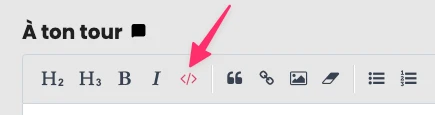
Et après tu peux rajouter comme l'a indiqué bucdany le nom du langage pour la coloration syntaxique :)
Geoffroy Streit
C'est noté, merci encore pour votre réactivité ! Vous assurez ! :)
Inscris-toi
(c'est gratuit !)

Tu dois créer un compte pour participer aux discussions.
Créer un compte